
Connecting to hotel Wi-Fi is often a frustrating experience. You have to log in on every single phone, tablet, and laptop. Then, the connection drops, or it runs too slow to watch a movie. Worse, public networks leave your personal data exposed to anyone else on the same network.
A good travel router solves all these problems. You connect the router to the hotel network once. Then, all your devices connect to your own private Wi-Fi bubble automatically. This keeps your data safe and saves you from logging in over and over again.
We looked at the top options and read thousands of real buyer reviews. This guide will help you find the right travel router to keep your devices fast and secure on your next trip.
Quick Comparison
| # | Product | Rating | Reviews | Best For | Action |
|---|---|---|---|---|---|
| #1 | GL.iNet Opal | 4.2 | 7069 | Basic Travel | View on Amazon |
| #2 | TP-Link Roam 6 AX1500 | 4.2 | 10646 | Compact Wi-Fi 6 | View on Amazon |
| #3 | GL.iNet Slate 7 | 4.6 | 1080 | High-Speed Wi-Fi 7 | View on Amazon |
| #4 | TP-Link Roam 7 BE3600 | 4.4 | 19584 | Large Groups | View on Amazon |
| #5 | GL.iNet Beryl AX | 4.6 | 4808 | Remote Work | View on Amazon |
| #6 | TP-Link Roam 6 AX3000 | 4.4 | 11771 | Heavy Streaming | View on Amazon |
| #7 | TP-Link Roam 6 TL-WR1512X | 4.7 | 12 | Quick Setup | View on Amazon |
| #8 | GL.iNet Mango Router | 4.1 | 12752 | Ultra-Portable Use | View on Amazon |
| #9 | TP-Link AC750 Nano | 3.9 | 9834 | Basic Backup | View on Amazon |
| #10 | GL.iNet Slate AX | 4.5 | 3559 | Stable Connection | View on Amazon |
#1 Best Basic Option — GL.iNet Opal

The GL.iNet Opal suits travelers who want a simple way to share a single internet connection. It fits easily in a pocket and works well for basic web browsing and email.
The OpenWRT software makes the biggest real difference here. This system lets you change almost every network setting you can think of. You can set up custom firewalls, block ads, and run your own VPN client directly from the router.
Most buyers agree that the router offers great value for the features it provides. People love how easily it connects multiple devices to a single hotel connection. However, many users note that the older processor struggles to maintain fast speeds when you turn on heavy VPN encryption.
This router shines when you stay in a hotel that limits how many devices you can connect. You just connect the router to the hotel Wi-Fi, and all your devices can share that single approved connection.
Honestly, the deep settings menu stands out most. You can change almost everything. I would recommend this to people who like to tinker with their network. I would not pick this if you need fast VPN speeds, because the older processor slows things down.
✅ Pros
- Fits easily into a small pocket
- Lets you change advanced network settings
- Connects multiple devices to one hotel login
- Includes a physical switch for quick changes
❌ Cons
- Slows down when running heavy VPN encryption
- Has very little internal storage space
💬 What Customers Say
Most buyers agree that this router makes traveling with multiple devices much easier. People love the deep settings menu and the ability to run a VPN directly on the router. However, heavy users often complain that the router slows down significantly when transferring large files over a secure connection.
#2 Best Compact Wi-Fi 6 — TP-Link Roam 6 AX1500

The TP-Link Roam 6 AX1500 suits people who want modern Wi-Fi speeds in a very small package. It works well for remote workers who need a reliable connection in coffee shops or airports.
The USB-C power port makes the biggest difference for travelers. You do not need to carry a special power brick. You can power the router using a standard phone charger or a portable power bank.
Buyers who travel often say this router connects to hotel networks quickly and easily. People mention that the phone app makes setup very simple. However, several users complain about the smart connect feature. They report that it sometimes slows down fast devices for no clear reason.
This router works best when you work from a public cafe. You can plug it into a small power bank, connect to the public Wi-Fi, and keep your laptop secure behind your own private network.
Honestly, the small size makes it a great travel companion. It fits in any pocket. I would recommend this to anyone who travels light. I would look elsewhere if you want to run custom open-source software, as this router blocks it.
✅ Pros
- Takes up very little space in a bag
- Runs easily off a portable power bank
- Sets up quickly using a simple phone app
- Handles captive portal logins easily
❌ Cons
- Smart connect feature can slow down some devices
- Does not allow custom open-source software
💬 What Customers Say
Travelers who use this daily report that it connects to tricky hotel networks without much fuss. People love how light it feels and how easily it runs off a battery pack. On the downside, a few tech-savvy buyers mention that the automatic band steering feature causes unexpected speed drops.
#3 Best Premium Pick — GL.iNet Slate 7

The GL.iNet Slate 7 suits serious tech users who want the fastest possible speeds on the road. It uses the newest Wi-Fi 7 technology to handle heavy data transfers and smooth video streaming.
The built-in touchscreen changes how you use the router. Instead of opening a phone app to check your connection or turn on your VPN, you just tap the screen. This saves time and makes troubleshooting much easier.
Across thousands of reviews, the thing people mention most is the connection stability. Buyers love that it holds a strong signal and reconnects automatically if the hotel Wi-Fi drops. A few early buyers noted some minor software bugs, but they also praised the company for fixing them quickly.
This router shines when you need to stream live video from a remote location. The fast processor and strong antennas keep the video feed smooth even when the local network gets crowded.
Honestly, the touchscreen makes a huge difference. You do not have to open a phone app just to change a basic setting. I would recommend this to heavy travelers who connect to new networks often. I would skip this if you just want a simple, basic connection.
✅ Pros
- Delivers extremely fast Wi-Fi 7 speeds
- Touchscreen makes changing settings very fast
- Holds a stable connection without dropping
- Handles hotel login pages without errors
❌ Cons
- Takes up more space than basic travel routers
- Can have minor software bugs on release
💬 What Customers Say
Most buyers agree that this router provides an incredibly stable connection. People who travel for business say it handles tricky hotel login pages better than older models. While some users experienced early software bugs, they report that the manufacturer responds quickly and provides helpful updates.
#4 Best for Large Groups — TP-Link Roam 7
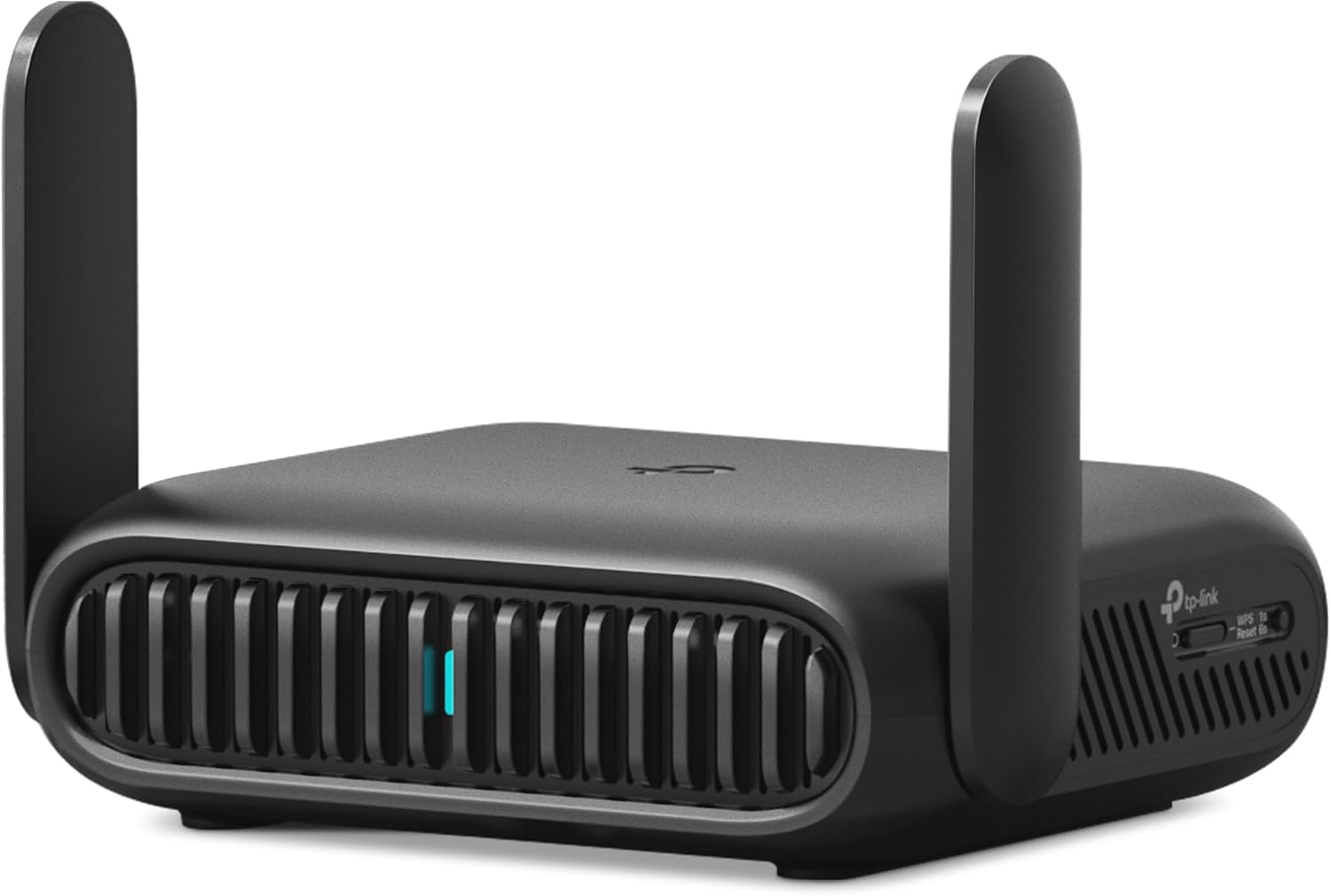
The TP-Link Roam 7 suits families or teams traveling together with many devices. It handles heavy traffic well and keeps everyone connected at the same time.
The ability to handle up to 90 devices makes the biggest real difference. Most small routers crash or slow down when a family connects phones, tablets, watches, and laptops all at once. This one keeps traffic moving smoothly.
Buyers praise how easy the router is to set up right out of the box. Families say it covers large vacation rental homes easily. However, a few users report that the Wi-Fi connection sometimes drops and requires a quick restart to work again.
This router works best when you rent a large Airbnb with a group. You plug it into the main modem, and it provides a strong, secure signal to every bedroom in the house.
Honestly, the ability to handle 90 devices is impressive. Most travel routers struggle with half that number. I would recommend this to large families traveling together. I would not pick this if you specifically want the 6 GHz band, because this model leaves it out.
✅ Pros
- Connects up to 90 devices without crashing
- Sets up very fast using the phone app
- Pushes a strong signal through large rooms
- Includes fast multi-gigabit wired ports
❌ Cons
- Does not support the newer 6 GHz band
- Sometimes requires a restart to fix dropped signals
💬 What Customers Say
Families who switched to this say it handles their many devices without slowing down. Buyers love the simple app instructions that make setup take only a few minutes. A common complaint is that the wireless signal occasionally drops, forcing the user to reboot the router to get back online.
#5 Best Overall — GL.iNet Beryl AX

The GL.iNet Beryl AX suits remote workers who need a secure, fast connection wherever they travel. It balances speed, size, and advanced features very well.
The physical toggle switch on the side changes how you protect your data. You can set the switch to turn your VPN on or off instantly. You do not need to log into a menu to secure your connection when you sit down at a public cafe.
Travelers who use this daily report that it connects to tricky airport and hotel networks easily. People love how fast it runs on the newer Wi-Fi 6 standard. However, some users note that the router tries to push devices to the slower 2.4 GHz band by default.
This router shines when you travel internationally and need to access home services. You connect it to the hotel Wi-Fi, flip the VPN switch, and all your devices act like they are sitting in your living room.
Honestly, the physical toggle switch is my favorite feature. You can turn your VPN on or off with a simple flick. I would recommend this to remote workers who need to secure their connection quickly. I would pause if you hate changing settings, as it tends to favor the slower 2.4 GHz band by default.
✅ Pros
- Physical switch turns VPN on and off instantly
- Delivers fast Wi-Fi 6 speeds for video calls
- Runs on open-source software for deep control
- Powers easily from a standard USB-C cable
❌ Cons
- Tends to favor the slower band by default
- Can be tricky to configure for the first time
💬 What Customers Say
Most buyers agree that this router provides a perfect balance of size and speed. People love the physical switch that lets them activate their VPN without opening an app. The main complaint is that the router sometimes forces devices onto the slower wireless band until you change the settings manually.
#6 Best for Heavy Use — TP-Link Roam 6 AX3000

The TP-Link Roam 6 AX3000 suits people who push their network hard with heavy downloads and 4K video streaming. It offers the processing power needed to handle heavy traffic.
The thermal design makes a huge difference in real life. Many travel routers get very hot and slow down when you stream video for hours. This model stays cool, which keeps your connection fast and stable all day.
Across thousands of reviews, the thing people mention most is the excellent range. Buyers say it pushes a strong signal through walls easily. However, many users complain that the captive portal setup process takes too many confusing steps.
This router works best when you stay in an extended-stay hotel for a month. You can set it up once, connect your streaming boxes and laptops, and enjoy reliable internet without the router overheating.
Honestly, the cooling design works very well. Many small routers get hot and slow down, but this one stays cool. I would recommend this to people who stream a lot of video. I would look elsewhere if you want a simple setup, because the captive portal process takes some extra steps.
✅ Pros
- Stays cool during heavy video streaming
- Pushes a strong signal across large rooms
- Handles fast Wi-Fi 6 speeds easily
- Lets you block specific websites for kids
❌ Cons
- Takes extra steps to clear hotel login pages
- Smart connect feature bounces devices between bands
💬 What Customers Say
Gamers and heavy streamers report that this router handles high traffic without overheating. Buyers love the strong signal that reaches every corner of a large hotel suite. However, a complaint that comes up often is that the smart connect feature causes devices to disconnect and reconnect randomly.
#7 Best for Easy Setup — TP-Link Roam 6 TL-WR1512X

The TP-Link Roam 6 TL-WR1512X suits casual travelers who want better Wi-Fi without dealing with complex network settings. It makes getting online very simple.
The setup wizard in the phone app takes away all the guesswork. It walks you through finding the hotel network, connecting to it, and creating your own private bubble in just a few taps.
Buyers who switched to this say it removes the headache of hotel captive portals. People love how easily it shares a single connection with all their devices. A few users mention that some cellular carriers block the phone tethering feature, which limits how you can use it.
This router shines when you arrive at a hotel tired and just want your devices to work. You plug it in, follow the app prompts, and your phone, tablet, and laptop all connect automatically.
Honestly, the app setup makes this very easy to use. The app walks you through every step clearly. I would recommend this to people who feel nervous about setting up network gear. I would skip this if you need advanced routing features.
✅ Pros
- Guides you through setup with a simple app
- Connects up to 60 devices at the same time
- Clears hotel login pages in one easy step
- Fits easily into any small travel bag
❌ Cons
- Some cellular providers block the tethering feature
- Lacks advanced settings for power users
💬 What Customers Say
Most buyers agree that this router is incredibly easy to get running. People who hate dealing with network settings say the app makes the process painless. The only recurring issue is that some users find their cell phone provider blocks the router from sharing mobile data.
#8 Best Ultra-Portable — GL.iNet Mango

The GL.iNet Mango suits backpackers and minimalists who need a basic connection and count every ounce in their bag. It is incredibly small and light.
The tiny size and weight matter most here. It weighs less than two ounces and takes up almost no room. You can throw it in a laptop bag and forget it is there until you need it.
Buyers love how easily it powers from an old phone charger or a laptop USB port. People use it often to connect streaming sticks to hotel TVs. However, many users complain that the old 2.4 GHz band runs too slow for modern video calls or large downloads.
This router works best as an emergency backup. If the Wi-Fi in your room is terrible, you can plug this into the wired ethernet port on the desk and create your own basic Wi-Fi hotspot.
Honestly, the tiny size is the only real reason to choose this. It weighs almost nothing. I would recommend this as an emergency backup to keep in your laptop bag. I would not pick this for daily use, because the old 2.4 GHz band is just too slow for modern needs.
✅ Pros
- Weighs almost nothing in your travel bag
- Powers easily from any standard USB port
- Works well for basic streaming sticks
- Runs custom open-source software
❌ Cons
- Only supports the slower 2.4 GHz wireless band
- Uses an older micro-USB port instead of USB-C
💬 What Customers Say
Travelers who pack light say this router is perfect for basic tasks and streaming. Buyers love that they can power it directly from their laptop. However, a complaint that comes up often is that the connection speed is too slow for heavy work tasks or large file transfers.
#9 Best Basic Backup — TP-Link AC750 Nano

The TP-Link AC750 Nano suits travelers who want a small, versatile device to handle basic hotel Wi-Fi connections. It offers a few different ways to get online.
The physical mode switch on the side makes it very easy to use. You can slide the switch to change from a router to a hotspot or a range extender. You do not have to log into a menu to change how the device works.
Buyers say it connects well to older hotel networks and works great for getting smart TVs online. People like the small size. However, several users warn that plugging a USB hard drive into the router can corrupt the drive and delete files.
This router shines when you stay in a hotel that only provides a wired ethernet cable. You plug the cable into the router, flip the switch to access point mode, and you instantly have Wi-Fi for your phone.
Honestly, the physical mode switch on the side is very handy. You can change from a router to a hotspot without opening a menu. I would recommend this for basic web browsing in hotels. I would absolutely avoid plugging a hard drive into it, as multiple buyers report it damages storage drives.
✅ Pros
- Changes modes quickly with a physical switch
- Fits easily into small pockets or purses
- Connects smart TVs to hotel networks easily
- Provides a stable signal for basic browsing
❌ Cons
- USB sharing feature can corrupt hard drives
- Struggles to handle many devices at once
💬 What Customers Say
Most buyers agree that this tiny router solves the problem of connecting streaming sticks to hotel Wi-Fi. People love the simple hardware switch on the side. However, a major complaint is that the media server function is broken and has actually erased data from connected USB drives.
#10 Best for Remote Work — GL.iNet Slate AX

The GL.iNet Slate AX suits professionals who need a rock-solid, secure connection to work from anywhere. It handles heavy traffic and strong encryption without slowing down.
The strong internal antennas make the biggest difference for daily work. They pull in weak hotel Wi-Fi signals and turn them into a fast, stable connection. This keeps your video calls from dropping when you are far from the hotel router.
Remote workers who use this daily report that it handles VPN traffic much faster than older models. Buyers love the solid build quality. However, some users note that the router gets quite warm during long work sessions and feels a bit heavy in a bag.
This router works best when you need to join an important video meeting from an RV park or a busy hotel. The strong antennas grab the weak signal, and the fast processor keeps your video feed clear.
Honestly, the connection stability is fantastic. It holds a strong signal even when the hotel Wi-Fi is weak. I would recommend this to people who take video calls on the road. I would look elsewhere if you travel very light, as it feels a bit heavy for its size.
✅ Pros
- Pulls in weak Wi-Fi signals very well
- Handles heavy VPN encryption at high speeds
- Connects up to 120 devices at the same time
- Clears hotel login pages easily
❌ Cons
- Gets warm during heavy, all-day use
- Feels heavier than most travel routers
💬 What Customers Say
Professionals who work from the road say this router provides an incredibly dependable connection. Buyers love how fast it runs their secure work VPNs. On the downside, a few people mention that the router runs warm and adds noticeable weight to a small travel bag.
Frequently Asked Questions
Do I really need a travel router if my phone has a hotspot?
What is a captive portal?
Will a travel router make the hotel Wi-Fi faster?
Can I use a travel router on a cruise ship?
Do I have to pay a monthly fee to use a travel router?
Conclusion
Finding the right travel router comes down to how much speed you need and how much you want to tinker with settings. The GL.iNet Beryl AX stands out as the best overall choice. It offers fast Wi-Fi 6 speeds, a handy physical switch for your VPN, and handles tricky hotel login pages without much fuss.
If you want something incredibly small just for basic use, the GL.iNet Mango is a great alternative. It weighs almost nothing and works perfectly for getting a streaming stick online, though it lacks the speed needed for heavy remote work. Pick the one that fits your travel style, and enjoy never logging into hotel Wi-Fi on your phone again.